

Samsung Wallet
100M+
App information
- Name:
- Samsung Wallet
- Category:
- Lifestyle
- Safety:
- Not verified
- Price:
- Free
- Developer:
- Samsung Electronics Co., Ltd.
- Download:
- 100M+
Screenshots





About
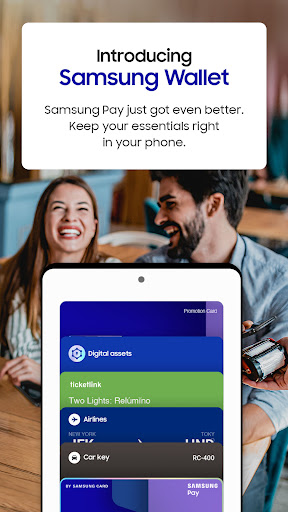
Samsung Wallet consolidates payment cards, digital keys, and asset management into one app. It suits Samsung device owners needing a simplified way to manage their digital essentials. For example, quickly accessing a boarding pass or making a payment streamlines everyday transactions.
What Stands Out
- Carrying credit, debit, gift, and membership cards for easy tap-to-pay transactions.
- Storing digital home and car keys for convenient unlocking and remote start.
- Tracking cryptocurrency balances and prices through integrated exchange partners.
- Adding airline boarding passes for quick access before flights.
Things to Consider
Samsung Wallet is exclusive to compatible Samsung devices, and feature availability varies by model, region, and carrier. Some features like digital keys and specific payment card support depend on third-party partnerships and may require additional device updates to function correctly.
Useful Tips
- Swipe up from the bottom of your screen to quickly launch Samsung Wallet.
- Add eligible digital home and car keys to avoid carrying physical sets.
- Link supported cryptocurrency exchanges to monitor your digital assets directly.
- Store airline boarding passes within the app for easy access at the airport.
More Apps
 ビックカメラShopping★ 5.01M+
 손목닥터9988Health & Fitness★ 5.01M+
 ScottishPower - Your EnergyHouse & Home★ 5.01M+
 調整さんProductivity★ 5.0100K+
 PrestaCOPFinance★ 5.050K+
 YouVersion BibleBooks & Reference★ 4.9100M+
 Question.AI - Chatbot&Math AIEducation★ 4.95M+
 Centi PRO - Currency ConverterFinance★ 4.91K+
 Word Search ExplorerWord★ 4.95M+
 Collage Maker | Photo EditorPhotography★ 4.9100M+
 Panera BreadFood & Drink★ 4.95M+
 StardustTV - Movies & DramasEntertainment★ 4.9500K+
 Waymo OneMaps & Navigation★ 4.91M+
 PopeyesFood & Drink★ 4.95M+
 CHANI: Your Astrology GuideLifestyle★ 4.950K+
 Al Quran (Tafsir & by Word)Books & Reference★ 4.95M+
 ColorNote Notepad NotesProductivity★ 4.9100M+
 SpeedwayFood & Drink★ 4.95M+
 Bubble Level - Level ToolTools★ 4.91M+
 MPCTravel & Local★ 4.91M+
 Marriott BonvoyTravel & Local★ 4.910M+
 ArriveCANTravel & Local★ 4.95M+
 LimeTravel & Local★ 4.910M+
 GIF Sticker & WAstickerSocial★ 4.95M+
 漢字辞典Books & Reference★ 4.9500K+
 ChewyShopping★ 4.910M+
 EventbriteEntertainment★ 4.910M+
 Vita MahjongBoard★ 4.9100M+
 NPRNews & Magazines★ 4.85M+
 7-ElevenFood & Drink★ 4.810M+